
02 / ENTERPRISE MOBILE
Order from Noise
Designing a notification system for high-stakes physical security environments
Enter password to view case study
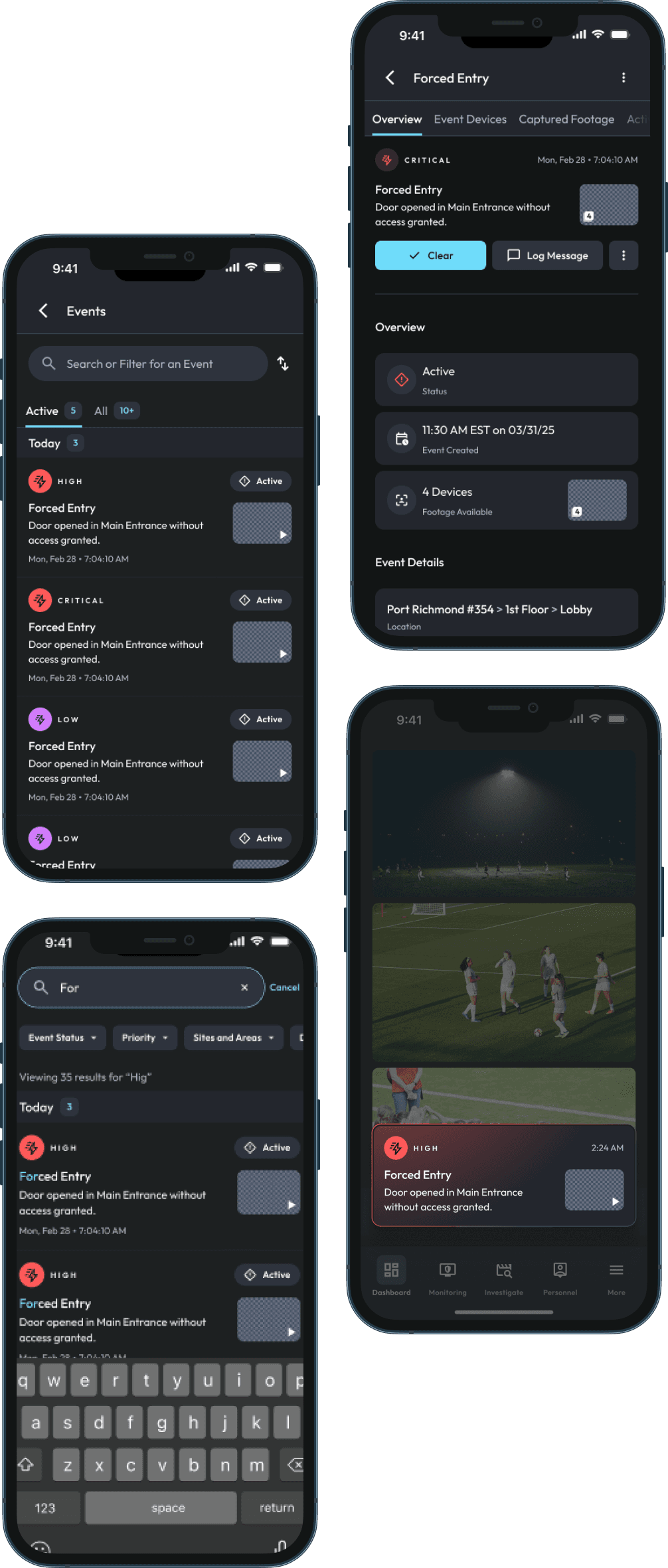
The real design problem wasn't how to display notifications. It was how to classify them first.
01 / HOW IT STARTED
Mobile had no space for the most critical information operators receive.
Security operators in the field rely on their phones as a backup line of defense. When something goes wrong — a door forced open, a camera offline, an unrecognized vehicle in a restricted space — they need to know immediately, understand what happened, and know what to do next.
The Johnson Controls app had none of this. Alerts existed on desktop, but mobile users had no dedicated place to store, filter, or triage them. In an environment where a missed alert means a security gap, this wasn't a product gap. It was a fundamental failure of the mobile experience.
We were brought in to build that space from the ground up.

My Contribution
Usability Testing
Analysing Insights
Product Audit
Prototyping and Design
Tools
Figma

Miro

Jira
02 / THE USERS
But who needs these notifications?
Before touching a screen, I needed to understand who was receiving these notifications and what their world actually looked like. Research surfaced two primary users — with the same information needs but completely different relationships to urgency.
Designing one notification experience to serve both would mean designing it well for neither.

The Operator
In the field, monitoring live. When an alert fires, they need to triage it immediately — what happened, where, how serious — and act. They can't scroll a cluttered feed or decode ambiguous color coding. Every second of friction is a second the situation escalates.
Operator
Empathy Map : Operator

The Admin
Reviewing at the end of a shift or off-hours. Not reacting — auditing. They want to scan history, understand patterns, and confirm nothing was missed. Speed matters less than completeness and clarity.
Admin
Empathy Map : Administrator
The empathy mapping surfaced a key insight: these two users weren't just different personas. They were in fundamentally different mental states when they opened the app. Designing one notification experience to serve both would mean designing it well for neither.
03 / Findings
Twenty-three notification types. One feed. No hierarchy.
With user context established, we inventoried every notification the system needed to surface. What we found was more complex than anyone had initially scoped.
Notifications came from four distinct sources — each with different urgency levels, different ownership, and different expected actions.
Camera and analytics events
motion detected
person detected
vehicle identified
license plate recognized
video loss
Access control events
door forced open
Credential denied
Unauthorized entry attempt
Device health alerts
Camera offline
Recorder unreachable
NVR storage full
System Events
Firmware updates
App Updates
Shared Clips
Account Activity
On the surface, these are all "notifications." But they have almost nothing in common. Some demand an immediate physical response. Others can wait until morning. Some are tied to a specific device at a specific location. Others belong to the user's account regardless of where they are.
They're not missing alerts because they're not paying attention. They're missing alerts because everything is asking for their attention."
- Quote by Product Manager
04 / HOW MIGHT WE
Questions that shaped every decision that followed.
05 / Competitive Research
How do other products organize their alerts?
Our operators weren't browsing. They were triaging. That reframe shaped what we looked for when studying how other products handle high-volume, mixed-priority feeds.
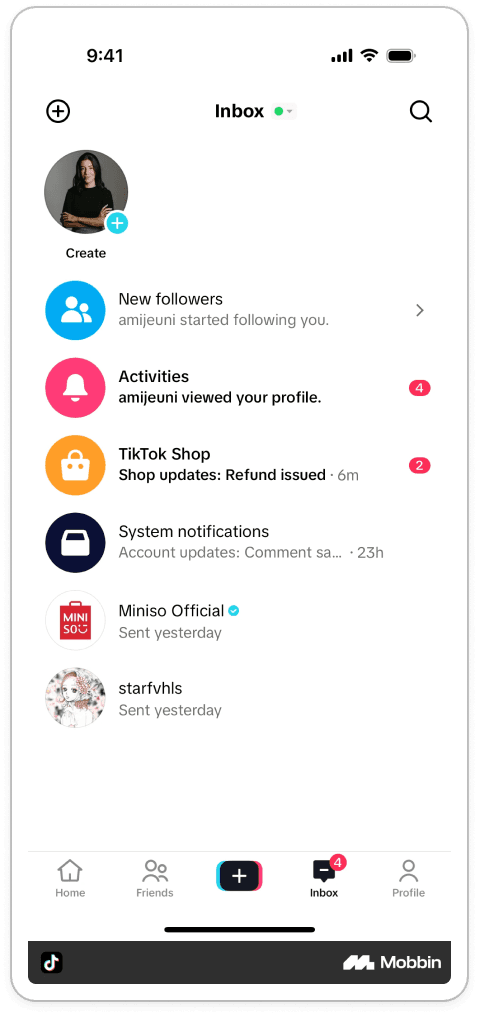
TikTok organizes notifications into groups by type
Pros :
Organizes notifications into groups by type, which you tap into to see individual items.
It reduces visual overwhelm
Lets users control over where to look first - User Agency.
Cons :
Navigation layer adds ambiguity before you tap a category.
You may lose time looking for what's relevant within the category.
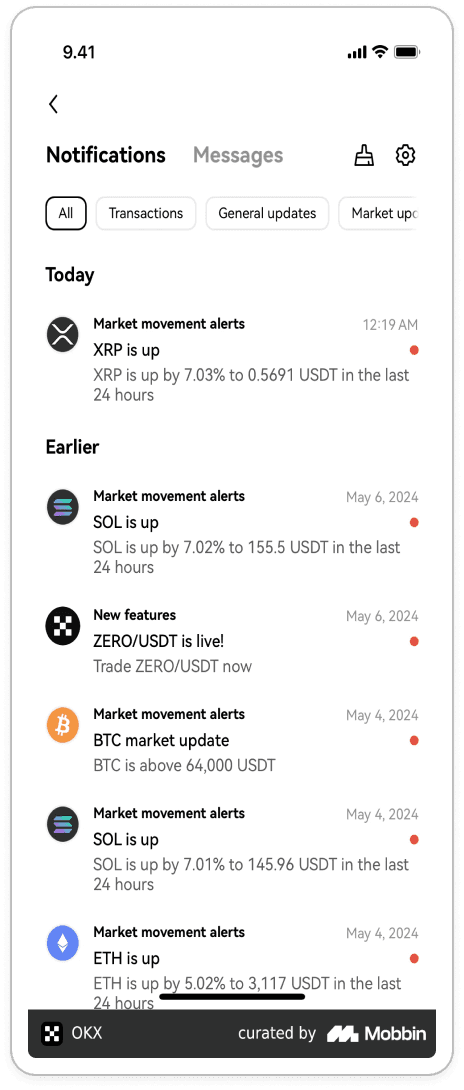
OXS took one unified list with filters and a search bar.
Pros :
One unified list with filters and a search bar. - Universal Pattern.
Everything visible, immediately scannable.
Individual search possible.
Cons :
When Notifcation density is high, it may become a wall of information.
Two search buttons CTA's confusing
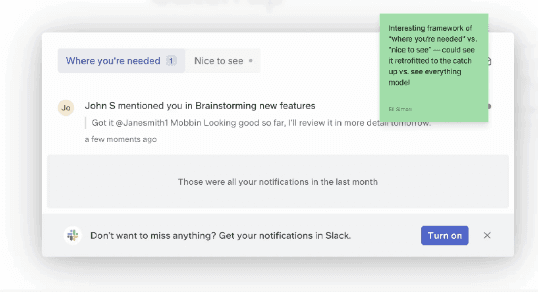
A third reference worth noting was a UI pattern labeled "where you're needed" - a framing that repositioned the notification feed as a catch-up surface rather than an alert queue.
It was a small conceptual shift, but it pointed at something important: the emotional register of a notification matters as much as its content. Our operators weren't browsing. They were triaging.
Neither model was right for us as-is. We needed the clarity of separation that grouped views provide, without the navigation overhead — and the density management of filtered lists, without mixing urgent and non-urgent signals in the same view.
06 / THE ARCHITECTURE
Three structures. Same dead end.
We prototyped three structural directions: alerts split across pages, a tab-based filter system within a single list, and one long unified feed. All three ran into the same wall.
Grouped by category

Unified filtered list

Layered filters + chips

Where did we land?
We landed on full separation. Events in their own dedicated space. System Messages in theirs. Two notification types with fundamentally different purposes needed two fundamentally different experiences.
This reflected how users already thought about their work. Operators don't mentally file a forced-door alert in the same category as a firmware reminder. The architecture should reflect that.

Urgent, priority based, time sensitive and actionable.
Examples:
Gunshot heard
Motion detected
Door forced Open.
Device offline

Non urgent, informational system-level messages.
Examples
App updates
firmware
Sharing clips, live video
The Event Feed
The Events feed needed to serve both mental states — the Operator reacting in real time and the Admin reviewing after the fact. A single undifferentiated list would flatten that distinction. This was the HMW answer made visible. Active vs. All is literally the UI-level solution to distinguishing what demands action now from what can wait.
We introduced a tabbed structure at the top of the feed: Active and All. Active surfaces only unresolved, live events — exactly what an Operator needs mid-shift. All is the complete record, where an Admin can audit, search, and filter without wading through noise.

The Search Engine
Search behaved like a Google-style query — free text against event type, location, device name, or timestamp. Filters layered on top: priority level, event category, date range, device group.
The combination meant an Admin could move from "show me everything from last night" to "show me all forced-door alerts at the south entrance after 11pm" in two taps.
06 / THE ARCHITECTURE
From alert to action.
The Event Card
Event cards were designed to answer three questions before an operator taps anything:
What happened?
Where?
How serious?

Event type and location anchored the top of the card. Priority color anchored the left edge. Timestamp and device name completed the summary.
The card was the minimum viable piece of information for a triage decision. Everything else lived one tap deeper.
The detail view
Tapping a card opens the screen where an operator actually works. The design had to answer three questions immediately:
What happened?
What does it look like?
What's connected to it?
At the top: event type, priority level, timestamp, and location — the same hierarchy as the card, now untruncated and fully readable. Below that, captured footage from the moment of the alert, pulled directly from the associated camera. Operators can scrub the clip without leaving the screen. The primary action — clearing the event — sits at the top, with the option to log a message before closing it out.
Escalate
Priority is assigned automatically, based on rules the admin configures upfront. But rules can't anticipate every situation — an operator on the ground sometimes knows more than the system does.
So we gave them a way to override it. Escalate re-opens a cleared event and raises its priority, notifying additional operators and allowing the event to be shared out by SMS. The system sets the default. The operator can always correct it.
07 / System Messages
Calm on purpose.
System Messages had one job: inform without alarming. These notifications were non-urgent and informational — firmware updates, account activity, shared clips. We designed a deliberately quieter experience.

No priority color coding. No urgency markers. Clean typography, generous spacing, a single action — dismiss or view. If system messages looked like events, operators would second-guess their read of the feed every time they opened the app. The visual restraint was the design.
09 / The Color System
When the fix broke something else.
With the card design settled, we turned to the priority color system — and ran straight into an unexpected problem.
The original severity hierarchy felt intuitive: Yellow for low, Orange for medium, Red for high. A natural warm-to-urgent progression. We built the event cards around it and moved into design review.

The accessibility review changed everything.
We ran the color system through a color blindness simulator across 5 conditions — Protanopia, Deuteranopia, Tritanopia, and Achromatopsia. What we found was that yellow and orange, rendered on our dark card backgrounds at mobile scale, were nearly indistinguishable under several conditions. An operator with red-green color blindness couldn't reliably tell a low-priority event from a medium one.


To fix the contrast issue, we introduced purple as a replacement for orange at medium priority. It passed accessibility checks and was visually distinct from both yellow and red. When we looked at it in context though, it seemed to break something else.



The purple problem
Purple solved the contrast problem. It also became the loudest color on the screen. In testing, operators were reacting to medium-priority events before high-priority ones — the exact inverse of what the system was designed to produce.
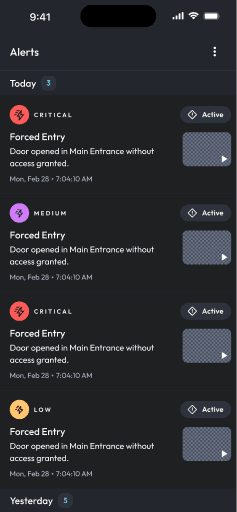
Try it yourself: Where do your eyes go first?
Chances are, purple, not red.
Color sequence carries semantic weight independent of hue. Colors have to communicate a gradient in the direction users expect, escalating from visually quiet to visually loud.
We restructured the hierarchy entirely:
Purple → low priority.
Orange → medium priority.
Red → high priority.

Purple receded. Orange held the middle. Red commanded the top. The sequence finally communicated what it was supposed to.
10 / Dev Handoff
Handing off without losing the why.
Design is only as good as what gets built. Going into handoff, I wanted to leave no room for ambiguity.
I delivered a full component library in Figma: every event card variant across all three priority levels, system message templates, empty states, error states, and interaction specs for swipe-to-dismiss and priority escalation. The color system came with contrast documentation and a severity-to-color mapping guide — no question about which hex value mapped to which priority level.
I led the dev review session directly, walking through edge cases and flagging decisions that had nuance behind them — particularly the reasoning for the final color hierarchy. Several implementation questions surfaced during that session that we resolved before engineering began building.

11 / LEARNINGS
Reflection
Here are some lessons from this project.
01
Systems Level Design
This project asked me to be a systems designer before a UI designer. The screens only worked because the classification was right first — and getting there required resisting the pressure to jump into visual design before the architecture was solid.
02
Accessibility Matters
The accessibility pivot was the most instructive moment. We didn't find a problem and fix it. We found a problem, applied a fix, discovered the fix created a new problem, and had to rethink the underlying logic. That sequence — fix, test, find new failure, rethink — is how real design problems actually get solved.
03
Defining a Notification
Physical security software sits at the intersection of IT, operations, and compliance, and each team had a different mental model of what a notification should be and do. Holding the line on the taxonomy decisions required making that reasoning legible to people who didn't share our design vocabulary.